Managing command line history across multiple computers
This is a situation that I first began to create tools to improve on a problem that I started to address about 7 years ago.
The problem is a simple one. As a command line junkie I've got a lot of commands that I run on my computer and we've got
a number of systems we can use to collect this information (the shell provides a mechanism by default), but things become increasingly more fraught the more
requirements we start to pile onto the problem.
We might start to routinely connect to servers where we're spending a lot of time working. So all of a sudden our
shell's history is missing a chunk of the work we're doing. This makes it a distributed problem.
bash's default behavior stinks! It easily and regularly overwrites its own history file.
First, history is totally lost on any unclean exits. This comes into play if a linux machine is rebooted or if you hit the reset button or the OS crashes or something like that.
Also, the way bash history works is when it starts, it reads its history file in to memory, and starts appending
commands you run to the list. Then, when bash exits, it will write this new list out to the file. You might see this
as sensible and it may even be elegant, but this poses massive problems for a practical modern workflow where we do more than one thing at a time. On really old versions of bash, if you open shell A and then open shell B in a second terminal session, run 50 commands in shell B, close
shell B, then close shell A, shell A will overwrite all of the history that shell B has already saved. Note that none of
the session closures had to be done uncleanly here. The logic was simply just not accounting for wanting to run more than one shell session at a time!
On newer versions of bash (even the still-ancient 3.x provided by macOS these days) closing bash sessions in
arbitrary order does appear to cause it to append the history of the session to the history file without blowing away others. But I know for a fact that there are race conditions that occur where history file truncation (detailed in the next bullet) can take place arbitrarily and still result in the loss of potentially important command history.
Even if you configure sane history settings for your shell, it will periodically clear out the oldest entries. That seems like a good idea at first, since it's nice to eliminate this as a reason for your disk to be filling up, but, if you care about keeping everything (and why wouldn't you, command history does not use up much space...) this auto truncation makes it much more difficult to cleanly preserve the data far into the future, because you now have to track pointers inside your history file to know where to start syncing to back it up somewhere else. If you just naively back up the shell history command file, it will quietly flush your older history off the top and it will be gone from your backups too unless you use snapshots in your backups, and if you do use snapshots, good luck searching for this content within them!
Dealing with this problem across multiple computers is pretty painful. Previously I had a system I made to handle
this, and it worked well for a short period of time (a good 5 years actually) but one of the things that I had to do on
each system I wanted to track this way was install a cronjob. That in itself is perhaps not too onerous, but I also
resolved to eliminate such a requirement this time around.
In July 2013 I came up with a nice solution for addressing the problem of shell-provided history log file deficiencies which lives on to this day. These principles continue to be relevant:
I was using oh-my-zsh and i added a preexec() based alternative so I could append the commands I am running in the
shell into a special new command history file. Importantly, this operation would take place and complete before the command is executed, so even long running commands that lead into unexpected computer shutdown are flushed to the file on disk before the command begins to execute. I also added additional metadata to this storage format. I used a
silly text delimiter $@$ to separate fields, so it was like CSV except this is just DADSV (Dollar-At-Dollar separated
values). That's because commas can clearly be easily found in shell commands. I mean, commands can include Pretty Much Anything... So I wanted to make
something reasonably short, but also weird enough not to see commonly. This has worked well. In terms of metadata I recorded stuff like:
working directory
timestamp
tty identifier
tmux session/window/pane ids
I also made some escapement scheme for newlines in the commands since I was already at this time prone to
experimenting with large shell incantations which often benefit from a little bit of formatting.
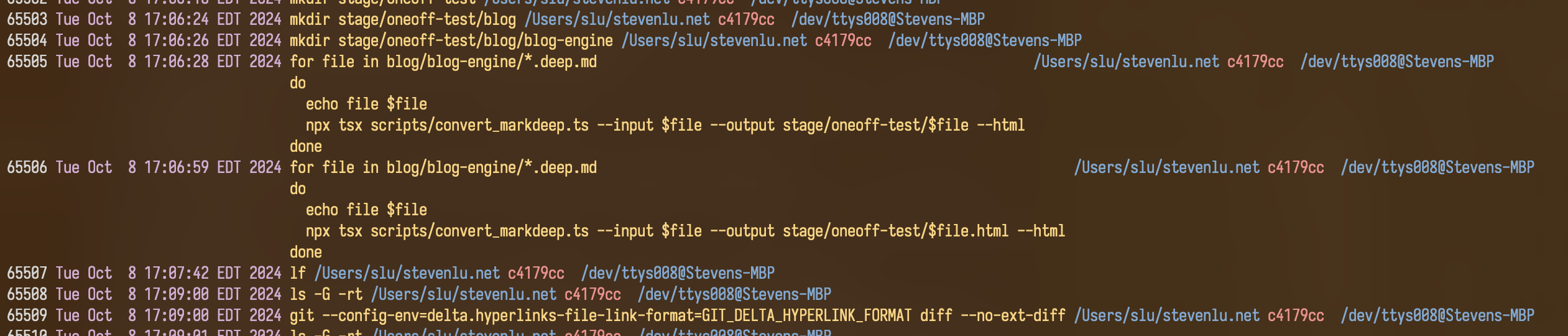
A Python script, which I named hist, that would consume this special ~/.zsh_enhanced_new_history file that I began using and renders it
into a better human readable format. It would nicely render the command back out in a central column and keep the metadata from interfering with it. It's a semi-tabular way to review the data:
This runs fast enough that it doesn't get bogged down by hundreds of thousands of history entries, so I continue to
use this thing.
Now that in itself helped a lot, but I needed to go further for multiple machines. I wanted to have a similar solution
for bash also but I figured if I care enough to improve bash, I could just set up zsh. Now that turned out not really a
great assumption either. For one reason or another there were always occasionally machines that either I wanted to keep
pristine from my full heavy dotfiles setup, or work machines (like jetson AI SBC environments or development VMs) that invariably never had proper multiuser setups so I could not ever justify polluting the environment with my personal developer tooling.
Now, originally my big hammer solution to multiple machines and trying to accommodate history log files that self-truncate, was the following system:
I would use a git repo.
I would have a text file that lists all the shell command history files that I care about, and I had a shell script that would simply sync and copy those local files into the git repo.
Then that script, which is installed as a cronjob, would just automatically pull and commit. The idea is if e.g. .bash_history got hundreds of lines of
history removed from the top of it, or if some stuff there got overwritten due to concurrent bash sessions, then since I'm doing this sync every few minutes I should be able to have some snapshots in git
of the intermediate states which I could use git pickaxe search to maybe actually be able to find it in the future
since git pickaxe is a content search.
In practice this works, but it is very inefficient. Predictably, git repo became impossibly huge after a few years of
use. I had to bring it offline from bitbucket where I had it because it exceeded the 2GB limit that was there. Nowadays,
bitbucket has fully given up, so since github now offers free private repos, all my personal repos are hosted on github now, but this repo is too big for github also. I was self hosting this repo on one of my servers for a bit.
So I finally hunkered down and made a proper attempt to do this the right way. I have only really the one North Star that I wanted to guide this one: Simplicity as an utmost priority. This means no databases, not even SQLite. Notably something I've been using without issues is Atuin, which does use SQLite, but I do feel it is overkill. I need text files, no more and no less.
So, the approach I'm taking is to enforce and rely on only ever appending. I will also double down on the preexec() hack
I used for zsh by leveraging PROMPT_COMMAND for the same purpose under bash.
I am making a small bootstrapper system that I can use to deploy this configuration into ~/.bashrc the moment i'm able
to SSH into a given machine. Typically some of the most important and often referenced command history are the package
installer and such configuration commands I'm doing in the provided bash shell on a fresh Linux system, so the fewer
dependencies I need to bootstrap this on a new system, the more likely I'm able to actually get value out of it.
The sync will be a hub and spokes model. The central computer is my main laptop machine and the process is that the laptop
has the cronjob that will cause it to go through and transfer the latest log content from configured target machines via SSH.
This means I do a one time initialization on any environment that minimally interferes with its configuration or operation (just one line
added to bottom of .bashrc) and from then on my laptop will be able to periodically fetch the latest command history
content at any time that it is able to reach it via SSH.